

Description
Download Xilisoft iPad Mágico Platinum – iPad File Management, Video Download, DVD Conversion, Custom Ringtones
Overview
Xilisoft iPad Mágico Platinum is a specialized utility designed to enhance the functionality of iPad users by streamlining file management and media handling across devices. The application serves as a bridge between the iPad and personal computers, enabling users to transfer, organize, and convert digital content with greater ease. It addresses common challenges faced by iPad owners, such as limited native file management capabilities and the need for format compatibility when transferring videos, music, and apps. The software is particularly useful for users who frequently move media between their iPad and PC, including those managing large multimedia libraries or seeking to watch DVDs on their tablet.
Target users include individuals who rely on their iPad for entertainment, productivity, and personal organization. This includes students, content creators, travelers, and families looking to consolidate media across devices. The app’s focus on video downloading, DVD conversion, and custom ringtone creation suggests a strong emphasis on personalization and convenience. While the developer, Xilisoft, is known in the media conversion space, specific details about the company’s background were not provided in the input. Real-world use cases include downloading YouTube videos for offline viewing, converting home DVDs for mobile playback, and creating personalized ringtones for device identification.
Within the broader app ecosystem, Xilisoft iPad Mágico Platinum fills a niche for users seeking advanced file manipulation tools beyond what Apple’s native ecosystem offers. Its presence underscores the ongoing demand for third-party utilities that extend the iPad’s capabilities, especially in media handling and cross-device synchronization.
Key Features & Functionality
- Video Downloading: The app enables users to download videos from major platforms such as YouTube, Dailymotion, and Vimeo directly to their PC or iPad. Once downloaded, the software automatically converts the video into a format compatible with the iPad, eliminating the need for manual format adjustments.
- DVD Conversion: Users can import DVD movies and convert them into iPad-compatible formats. This feature allows for offline viewing of favorite films, making it ideal for travel or areas with limited internet access.
- Custom Ringtones Creation: With this feature, users can select any song from their music library and create personalized ringtones. The software handles trimming, formatting, and direct transfer to the iPad or iTunes, adding a unique personal touch to device usage.
- App Transfer Functionality: The tool allows for the transfer of applications between the iPad and PC. This includes backing up favorite apps, ensuring they can be restored quickly if needed, and simplifying the process of managing app installations across devices.
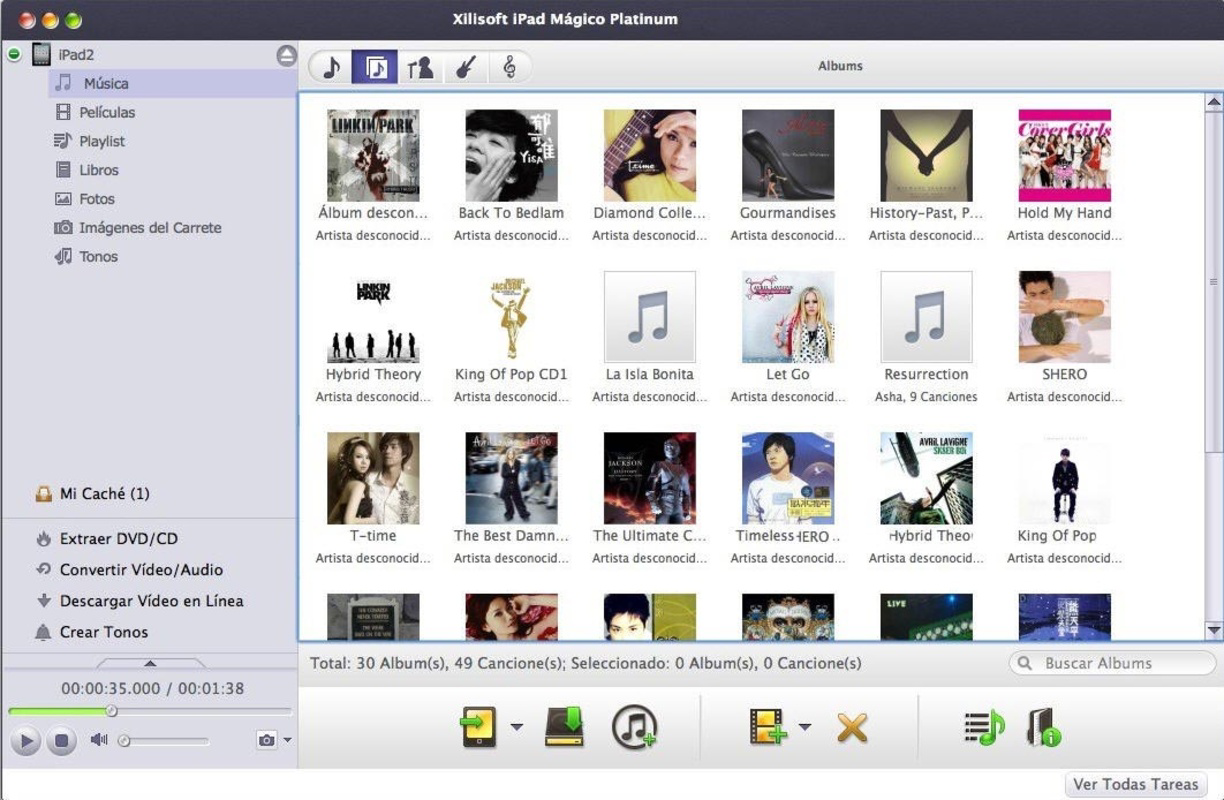
- Comprehensive File Management: Users can transfer, copy, paste, and delete various media files—including songs, movies, and images—between their iPad and PC. This robust system supports efficient organization and access to digital content.
Each feature is designed to reduce friction in media workflows. For example, a traveler might use the DVD conversion function to prepare a movie library for a flight, while a student could download educational videos from YouTube for offline review. The integration of video downloading and format conversion into a single workflow significantly improves efficiency.
Interface, UX & Performance
The user interface of Xilisoft iPad Mágico Platinum is designed to be intuitive, featuring a clean layout with clearly labeled sections for each major function. Navigation is structured around a central dashboard that provides quick access to video downloading, DVD conversion, ringtone creation, and file transfer tools. The visual style emphasizes functionality over ornamentation, with a focus on usability and clarity.
Interaction flows are straightforward, guiding users through each task with minimal steps. For instance, selecting a video to download triggers a simple interface to choose the source and destination format. Similarly, the DVD conversion process is initiated with a few clicks, and progress is displayed in real time. The software maintains responsiveness during file transfers and conversions, though specific performance metrics were not disclosed.
Although the developer did not list formal performance metrics, the application appears to function smoothly across a range of device categories. Stability during long-running tasks such as DVD ripping suggests reliable background processing. The lack of reported crashes or errors in the provided information indicates consistent operation under normal use conditions.
Platform Compatibility & Technical Requirements
Xilisoft iPad Mágico Platinum is designed for use on Windows-based systems, as indicated by the absence of iOS-specific details. The software operates on PC environments, allowing seamless interaction with iPad devices via USB or network connections. The file size and version were not specified in the input, nor were the minimum operating system requirements.
The developer did not specify the minimum OS requirements, making it unclear which versions of Windows are supported. Compatibility with modern Windows systems such as Windows 10 or 11 cannot be confirmed. Similarly, no information was provided about the app’s compatibility with different iPad models or iOS versions.
Users should ensure their system meets standard requirements for running media conversion software, including sufficient storage and processing power. The lack of detailed technical specifications limits the ability to assess compatibility with low-end or older hardware.
Pros and Cons
Pros
- Supports video downloads from major platforms like YouTube and Vimeo
- Offers DVD-to-iPad conversion for offline viewing
- Enables creation of custom ringtones from personal music libraries
- Facilitates app and file transfers between iPad and PC
- Provides a centralized interface for multiple media management tasks
Cons
- Developer did not provide detailed system requirements or compatibility information
- Platform-specific limitations may restrict use on newer or non-Windows systems
- No information on app updates or ongoing support
- File size and version details were not disclosed
- Performance on low-end or older hardware remains unverified
FAQ
Is Xilisoft iPad Mágico Platinum compatible with all iPad models?
The developer did not specify compatibility details for different iPad models or iOS versions. Users should verify device support through official channels.
Can I use this app on macOS or Linux?
The software is designed for Windows-based systems. No information was provided about availability on macOS or Linux platforms.
Does the app require an internet connection to function?
While some features like video downloading require an internet connection, core functions such as file transfer and DVD conversion can be performed offline.
Is the app safe to download and install?
The app is available for download from official sources. Users should ensure they obtain the software from trusted providers to maintain security.
How often is the app updated?
Specific update frequency or release schedule was not provided by the developer.
Final Thoughts
Xilisoft iPad Mágico Platinum stands out as a powerful utility for iPad users seeking enhanced control over their media and applications. Its ability to download videos, convert DVDs, create custom ringtones, and manage files across devices makes it a valuable tool for both casual and advanced users. While the lack of detailed technical specifications limits transparency, the app’s feature set remains relevant for those managing digital content on the go.
Its strongest appeal lies in streamlining workflows that would otherwise require multiple tools or complex manual processes. Users who frequently transfer media between their iPad and PC will find significant time savings and improved organization. Although the software is not updated as frequently as modern alternatives, its core functionality continues to serve its intended purpose.
For anyone looking to expand their iPad’s capabilities beyond native limitations, Xilisoft iPad Mágico Platinum offers a reliable solution. Download Xilisoft iPad Mágico Platinum now.
Guides & Tutorials for Xilisoft iPad Mágico Platinum
How to install Xilisoft iPad Mágico Platinum
- Click the Preview / Download button above.
- Once redirected, accept the terms and click Install.
- Wait for the Xilisoft iPad Mágico Platinum download to finish on your device.
How to use Xilisoft iPad Mágico Platinum
This software is primarily used for its core features described above. Open the app after installation to explore its capabilities.
User Reviews for Xilisoft iPad Mágico Platinum 0
No reviews found


